Easy Voice Recorder
DigipomProductivity
4.736.54K Reviews
- Version
- Varies With Device
- Installs
- 50.00M
- Age Rating
- Everyone
Screenshots
Our Review of Easy Voice Recorder
 Analysis by Appyee
I often remember something useful at exactly the wrong moment: while walking, cooking, driving, or trying to fall asleep. Typing is too slow, and trusting memory is worse. Easy Voice Recorder addresses that recurring problem with a simple productivity tool for capturing spoken notes, reminders, ideas, interviews, and other important moments before they disappear.
After using it as an everyday recorder, I found its main strength is not spectacle but speed. The app gets out of the way quickly, which matters more than a long feature list when the goal is to preserve a thought in a few seconds. It is free to start, rated for Everyone, and developed by Digipom. That combination makes it approachable for students, families, professionals, and anyone who wants a dedicated recorder instead of searching through a larger notes or messaging app.
My overall impression is favorable, especially for people who value low-friction voice capture. It is not the right choice for every recording job, though. People who need a full audio workstation, advanced editing, or a specialized interview workflow may outgrow it. For ordinary spoken notes and quick recordings, however, it solves a small but persistent problem unusually well.
Why the first few seconds matter
I think the first few seconds matter because a recorder is most useful when I can capture a thought before it turns into a task I have to remember. This section looks at the small choices that make a quick recording easier to use later, especially how I decide what deserves audio and how I leave myself a clear next step. A little intention at the start can keep a voice note from becoming another forgotten file.
The setup that makes recording genuinely useful
The first useful setup is less about customizing every option and more about deciding how I intend to use the app. I treat it as a capture tool, not a place to build a complicated audio library. That mindset keeps the workflow clear: open the recorder, start speaking, stop when finished, and give the file a name that will still make sense later.
A practical naming habit makes a bigger difference than it sounds. “Idea” is almost useless after several days, while a short label such as “kitchen shelf measurements” or “meeting action points” gives the recording a purpose. I also prefer recording one subject at a time instead of creating long, mixed files. A short note is easier to revisit than one recording containing several unrelated thoughts.
For a student, the first setup might involve creating brief spoken summaries after studying. For a parent, it could mean recording reminders while handling chores. For a professional, it may be a way to preserve a thought before opening a document. The app fits these situations because it does not require the user to turn every idea into a formal note immediately.
The free starting point is important here. I can test the basic workflow without committing money first, then decide whether the paid additions are worthwhile. In-app purchases range from $1.49 to $4.99 per item, so the sensible approach is to use the free experience for a while and pay only if a particular extra becomes relevant to my routine.
A better workflow than recording everything
Voice recording can become messy when every passing thought is saved without a system. My advice is to use it for information that benefits from speed or natural speech. A shopping reminder, a pronunciation practice clip, a personal reflection, or a quick outline for an article all make sense. A simple address or date may be faster to type and easier to search in a text note.
I also recommend ending each recording with a clear verbal marker when the file may be reviewed later. Saying, “Next step: call the supplier tomorrow,” is more useful than ending with an unfinished thought. This small habit turns a raw audio clip into an actionable reminder and reduces the time needed to listen again.
Another useful trade-off is recording length. Longer recordings preserve context, but they increase the effort required to find one sentence. Short clips are easier to manage, while a longer session is more appropriate when the conversation or lecture needs continuity. The app can support both habits, but the user has to choose the structure.
Everyday scenarios where it earns its place
Imagine I am walking home and suddenly remember the exact changes I want to make to a project. Pulling out the phone, opening a text editor, and typing while moving is awkward. With a recorder, I can speak the idea naturally, include the reasoning behind it, and return to the file when I am back at a desk. The time saved comes from avoiding the interruption, not from any complicated automation.
Cooking is another realistic example. My hands may be wet or occupied, but I can preserve a reminder about an ingredient, a timing adjustment, or a recipe variation. Later, I can replay the note instead of trying to reconstruct it from memory. This is especially helpful for ideas that are too detailed for a quick typed phrase but too minor to justify a formal document.
Students can use short clips to explain a difficult concept in their own words. Speaking forces me to reveal whether I actually understand the topic, and replaying the explanation can expose gaps that a copied written definition would hide. It is not a replacement for organized study notes, but it can be a useful second pass after reading.
For work, I find the app most useful before and after meetings rather than as a universal meeting recorder. A pre-meeting clip can hold questions I do not want to forget. An immediate post-meeting summary can capture decisions while they are fresh. This approach avoids creating a long audio archive when a concise personal recap is all I need.
Language learners can also benefit from recording short pronunciation exercises. Hearing my own voice makes repeated sounds easier to compare over time. The limitation is that the app records the practice; it does not replace a teacher or provide a complete language-learning course. Its value is in making repetition convenient.
Where it is less suitable
I would not choose this app as my main tool for detailed music production, podcast editing, or complex sound design. Those tasks require a deeper editing environment, track management, and more control than an everyday recorder is meant to provide. A dedicated audio editor is the better option when the recording itself is the finished product.
I would also think carefully before using a basic recorder as the sole system for formal interviews or important research. A long conversation may need clear file organization, reliable backup habits, easy marking of sections, and careful handling of consent. The app can capture spoken audio, but a dependable professional workflow involves more than pressing record.
There is a similar distinction with meetings involving other people. Recording someone is not merely a technical decision; it can involve workplace rules and personal consent. I would always make sure everyone understands what is happening before recording. The convenience of the app should never replace good judgment.
How much friction it removes in real use
Here I focus on the practical time saved by moving directly from an idea to a recording, and on the habits that keep that shortcut from creating clutter. I’ll also consider when a dedicated recorder is more convenient than typing into a notes app, and when a different tool is the better fit. The goal is not to record everything, but to make spoken capture genuinely useful in the moments when typing gets in the way.
From thought to file without detours
The central advantage is the short path between having something to say and preserving it. Many note-taking systems ask me to choose a notebook, format the text, or organize the item before I have captured the idea. Voice recording reverses that order: capture first, organize afterward. For fleeting thoughts, that is often the more realistic sequence.
This is also why a dedicated recorder can feel more dependable than using a messaging app. Sending a voice message to myself creates an extra destination and may bury the recording among conversations. A general notes app may be excellent for text but less natural when the content is spoken. Easy Voice Recorder stays focused on the act of recording, which reduces mental overhead.
The app’s broad adoption reflects that straightforward purpose. It has passed 50 million installs, with an average rating of 4.7 from around 622 thousand ratings and roughly 37 thousand written reviews. Those figures do not prove that every user will enjoy it, but they do suggest that the basic recording workflow has worked for a large audience over time.
Keeping recordings findable
The biggest hidden challenge is not starting a recording; it is finding the right one later. I recommend a consistent naming pattern and deleting disposable clips after using them. If I record several versions of the same idea, I keep the clearest one and remove the rest. This prevents the app from becoming a drawer full of unlabeled audio.
For recurring tasks, I use predictable words at the beginning of a title, such as “project,” “study,” or “personal.” Even without turning the recorder into a complex database, that habit makes scanning a list faster. It also helps separate a temporary reminder from a recording that deserves long-term keeping.
Short spoken introductions are useful too. At the start of a longer file, I can say the topic and intended action before continuing. That costs only a few seconds but saves time when I return to the recording later. It is one of those simple workflow improvements that is easy to overlook because it is not a flashy feature.
Sound quality and the environment
A recorder cannot fully compensate for a noisy room or a distant speaker. I get better results by moving closer to the sound source, avoiding places with constant background noise, and holding the phone steadily. For personal notes, ordinary surroundings are usually acceptable. For conversations, the environment becomes much more important.
This limitation is worth emphasizing because people sometimes judge a recording app by the microphone problem around it. If the source is muffled, the phone is covered, or several people are speaking at once, the result may be difficult to understand regardless of the app. Good positioning often improves clarity more than changing a setting.
I also avoid treating a voice recording as automatically permanent. Important files deserve a deliberate backup or transfer routine appropriate to the user’s wider device setup. A recorder is the capture point, not necessarily the complete archive strategy. If a recording matters, I make sure it exists somewhere I can access later rather than assuming every phone file will remain available forever.
Free use and paid extras
Because the app is free, it is easy to try without changing my whole note-taking system. That makes it a good fit for someone who wants to experiment with voice capture before deciding whether it belongs in daily life. The optional purchases may appeal to users who want more from the experience, but I would not pay simply because the app is popular.
My test would be practical: do I record often, do I return to the files, and does the free workflow create a real improvement? If the answer is no, purchasing extras will not solve the underlying habit problem. If the answer is yes, then the paid range is modest enough to consider on its usefulness rather than as a blind upgrade.
The app has been available since February 15, 2012, which gives it a long presence in a category where many utilities come and go. I see that longevity as reassuring, but I still judge it by my own workflow. A mature app can be stable and familiar while still not offering the specialized controls required by a particular profession.
Who should install it
I would recommend it to people who regularly lose ideas because typing takes too long. It is particularly suitable for students, writers, busy parents, commuters, language learners, and professionals who need quick personal reminders. It also suits anyone who prefers speaking over typing and wants an uncomplicated place to keep those recordings.
It is less compelling for someone who already has a reliable voice-note system inside another app and does not need a separate recorder. People who need automatic transcription, advanced collaboration, detailed editing, or a formal media library should compare it with tools designed specifically for those jobs. The best alternative depends on whether the priority is text conversion, team sharing, or audio production rather than simple capture.
My final judgment after using it
Easy Voice Recorder succeeds because it respects the moment when a thought appears. It does not ask me to turn every idea into a polished note before saving it, and that is exactly why I keep seeing value in it. The strongest benefit is measured in avoided interruptions: fewer half-remembered ideas, fewer awkward typing sessions, and fewer moments when I tell myself I will remember something later.
Its weaknesses are equally clear. Recordings need sensible names, noisy environments still create poor audio, and users seeking professional editing or structured collaboration will need another tool. The app is also only as organized as the person using it. Without a naming and cleanup habit, quick capture can become clutter.
Still, for a free productivity app rated for Everyone, it offers a focused solution to a common everyday problem. Digipom has kept the concept accessible enough for casual users while leaving room for people who want to make voice capture a regular habit. I would install it when I want a dependable spoken scratchpad, and I would recommend it to a friend who keeps saying, “I had a great idea, but I forgot it.”
My recommendation: choose it for fast personal recordings and spoken reminders, try the free experience first, and build a simple naming routine from the beginning. Skip it only if your needs already extend beyond quick voice capture into transcription, collaboration, or serious audio editing.
Verdict
Strengths of Easy Voice Recorder
- Records audio quickly with a simple, beginner-friendly interface.
- Supports common formats such as AAC, AMR, and PCM.
- Can continue recording while the screen is locked.
- Useful recording controls make trimming and organizing clips easy.
- Works well for lectures, meetings, interviews, and personal notes.
Limitations of Easy Voice Recorder
- Some advanced features require upgrading to the Pro version.
- The free version may include advertisements.
- Audio quality depends heavily on the phone’s built-in microphone.
- Long recordings can consume significant storage space.
- Limited editing tools compared with dedicated audio editors.
Other Releases by Digipom
View All
Easy Metronome
Music & Audio4.9

Easy Voice Recorder Pro
Productivity4.7
Similar Picks in This Category
View All
Google Calendar
Google LLC4.6

Google Drive
Google LLC4.3

Google Assistant
Google LLC3.9

Microsoft OneDrive
Microsoft Corporation4.6

Samsung Calendar
Samsung Electronics Co., Ltd.4.1

Microsoft OneNote: Save Notes
Microsoft Corporation4.6
Frequently Asked Questions
What is Easy Voice Recorder, and what can I use it for?
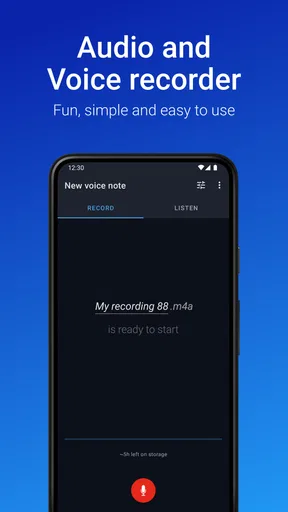
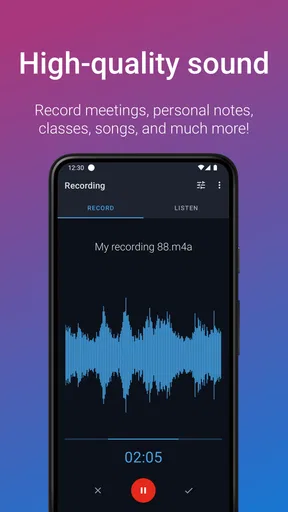
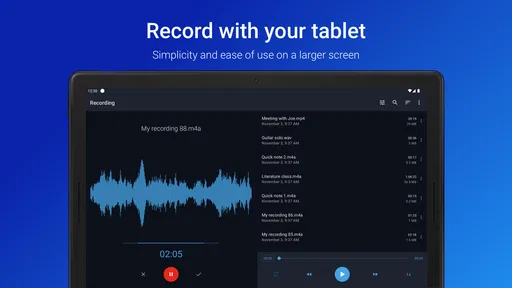
Easy Voice Recorder is a straightforward audio-recording app designed for capturing voice notes, meetings, lectures, interviews, ideas, and other everyday sounds. During testing, its main appeal was the simple interface: you can open the app, choose a recording format or quality when available, and start recording quickly. It is more suitable for casual and practical recordings than for advanced music production or professional studio work.
Does Easy Voice Recorder work offline, and does it require an account?
The core recording function generally works without an internet connection, which makes the app useful for classes, travel, interviews, or situations where mobile data is unavailable. In normal use, you can record and manage files locally on the device without creating an account. However, features such as cloud backup, synchronization, advertising removal, or premium options may depend on the version installed and could require additional setup or payment.
Where are recordings saved, and can I share or transfer them?
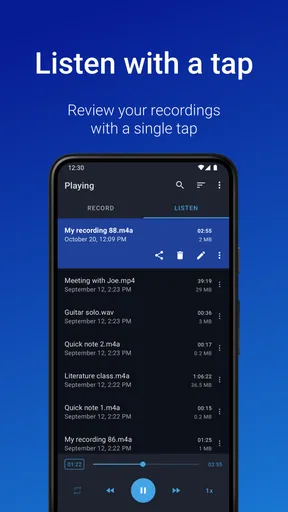
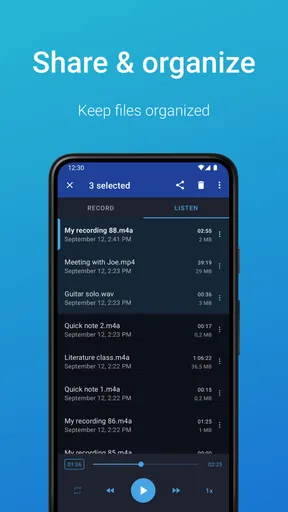
Recordings are normally saved in the app’s local storage or in a folder selected through the device’s storage settings. From the recording list, you can usually play files, rename them, delete unwanted takes, and share them through messaging apps, email, cloud storage, or other compatible services. Before uninstalling the app or changing phones, export important recordings because locally stored files may not automatically transfer.
What audio formats and recording quality does Easy Voice Recorder support?
Easy Voice Recorder is intended to offer practical recording quality rather than a complete professional audio workstation. Available formats, bit rates, sample rates, and quality controls can vary according to the Android or iOS version and the app edition. The free version may include limitations, while paid features can provide more control. Check the settings on your device before recording important material, especially if format compatibility matters.
Is Easy Voice Recorder free, and are there any limitations or privacy concerns?
Easy Voice Recorder can generally be downloaded and used at no initial cost, but the free experience may include advertisements, optional in-app purchases, or restrictions on certain features. Because the app records through your device microphone, it requires microphone permission, and storage access may also be needed to save files. Review the permissions and privacy information before use, and avoid recording private conversations without the knowledge or consent of everyone involved.
